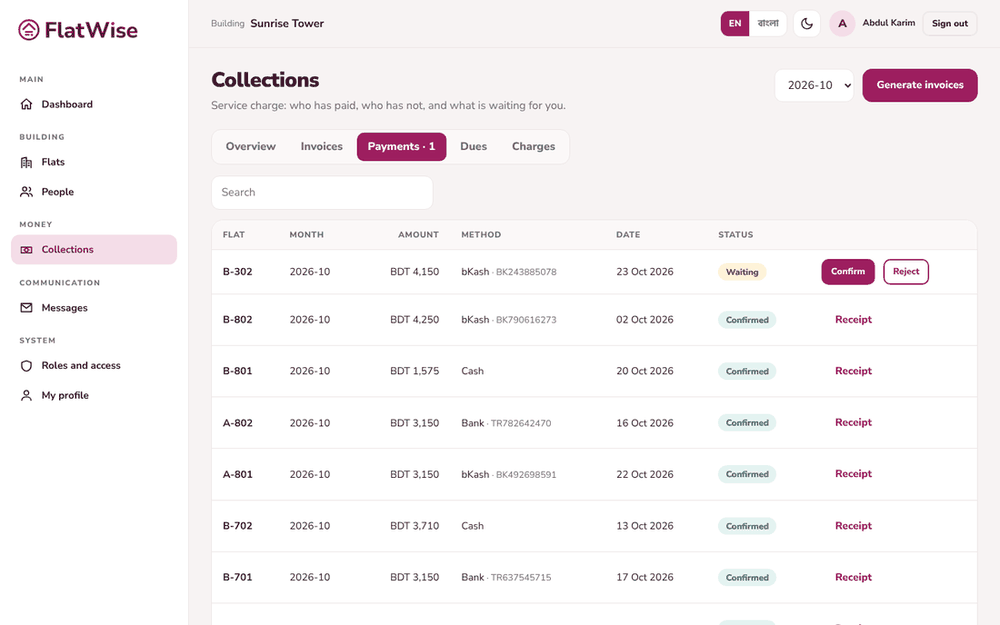
Confirm what residents say they paid, or record a payment yourself. Each confirmed payment gets a receipt and goes to the ledger.
Payments waiting to be checked
Steps
Open Collections, Payments tab. Payments waiting for you are at the top.
Compare the amount and the transaction ID with the bKash, Nagad or bank message. Press Confirm, or Reject if it does not match.
To record a payment yourself, open the invoice and press Record payment. Choose the method, enter the amount and the transaction ID for bKash or Nagad, and save.
A payment you record counts at once. A payment a resident submits counts only after you confirm it.
Each confirmed payment shows a receipt number. The same transaction ID cannot be used twice.
Tips
The Overview tab shows how many payments are waiting for you.
A wrong confirmed payment is not edited: the books are corrected with a reversing entry, so ask for help rather than deleting.