See your flat, the people in it and the things only you can do as the owner.
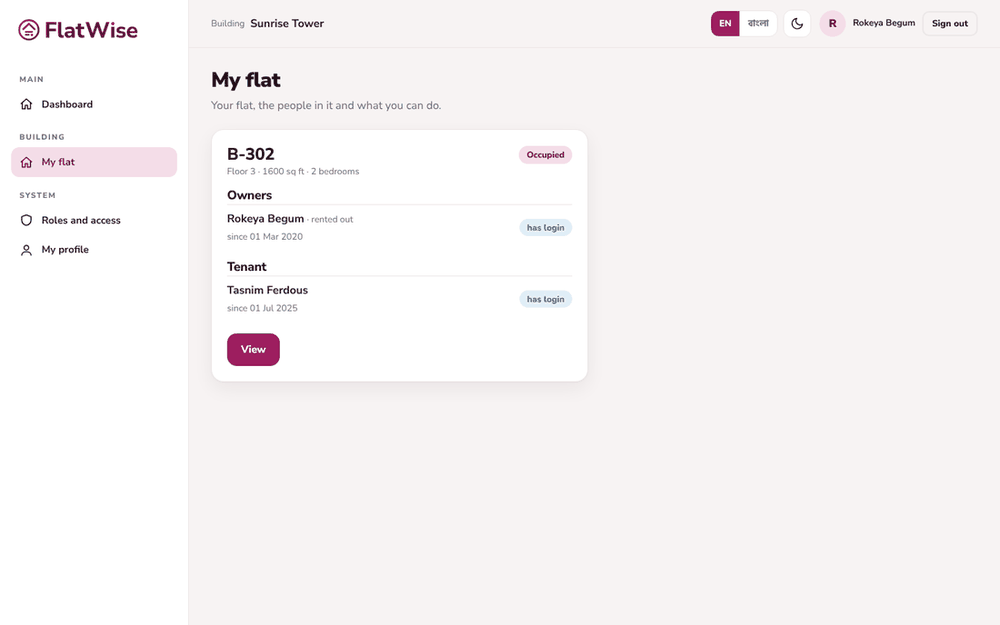 My flat for an owner
Steps
- Open My flat from the menu.
- You see your flat number, floor, area, the owners and the tenant.
- As an owner, press Add my tenant to record a new tenant, then follow the tenant onboarding steps.
- If the admin offered your vacant flat to let, press Approve letting to agree.
- If the screen says no flat is linked to your sign-in, ask the building admin to link it.
Tips
Your bills are on My dues and your parking on Parking.
Tenants see the flat but cannot change owners or letting.
Still stuck? Contact support
Tell us the screen, what you tried and what you saw. Do not send passwords.
Hours
[SUPPORT HOURS, for example Sat to Thu, 9:00 to 18:00]Send us a message

