Written for:Property AdminAgency ManagerTreasurerCommittee President
Setting up service charges
A flat's monthly bill is the total of the active charges. Set them once and every invoice follows.
Charge rules
Steps
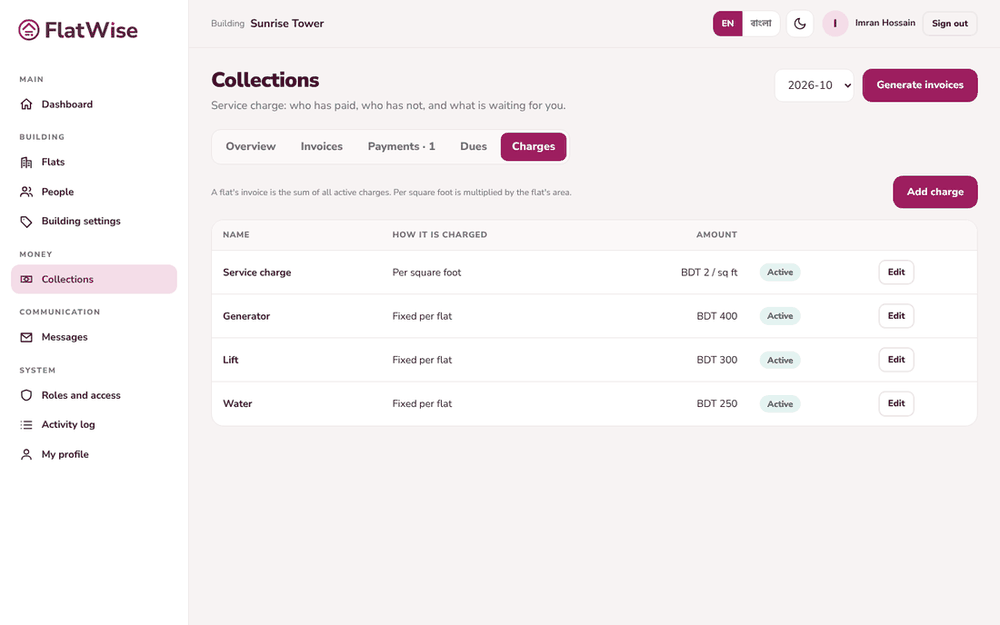
Open Collections and choose the Charges tab.
Press Add charge. Give it a name in English and in Bangla, for example Security.
Choose how it is charged: Fixed per flat, or Per square foot, which is multiplied by each flat's area.
Enter the amount in BDT and save. Untick Active to stop using a charge without deleting it.
Typical Dhaka buildings use service charge per sq ft plus fixed lines for security, cleaning, lift and generator, and a sinking fund. The setup wizard suggests these.
Tips
Changing a charge changes only invoices you generate afterwards. Past invoices stay as they were.
Per square foot needs each flat's area on the Flats screen.