Written for:Flat OwnerTenantOwner's Representative
Visitors: approve, pre-approve and regular helpers
Approve guests from your phone, give expected guests a code, and let your regular helpers in without asking.
A resident approves a visitor at the gate
Steps
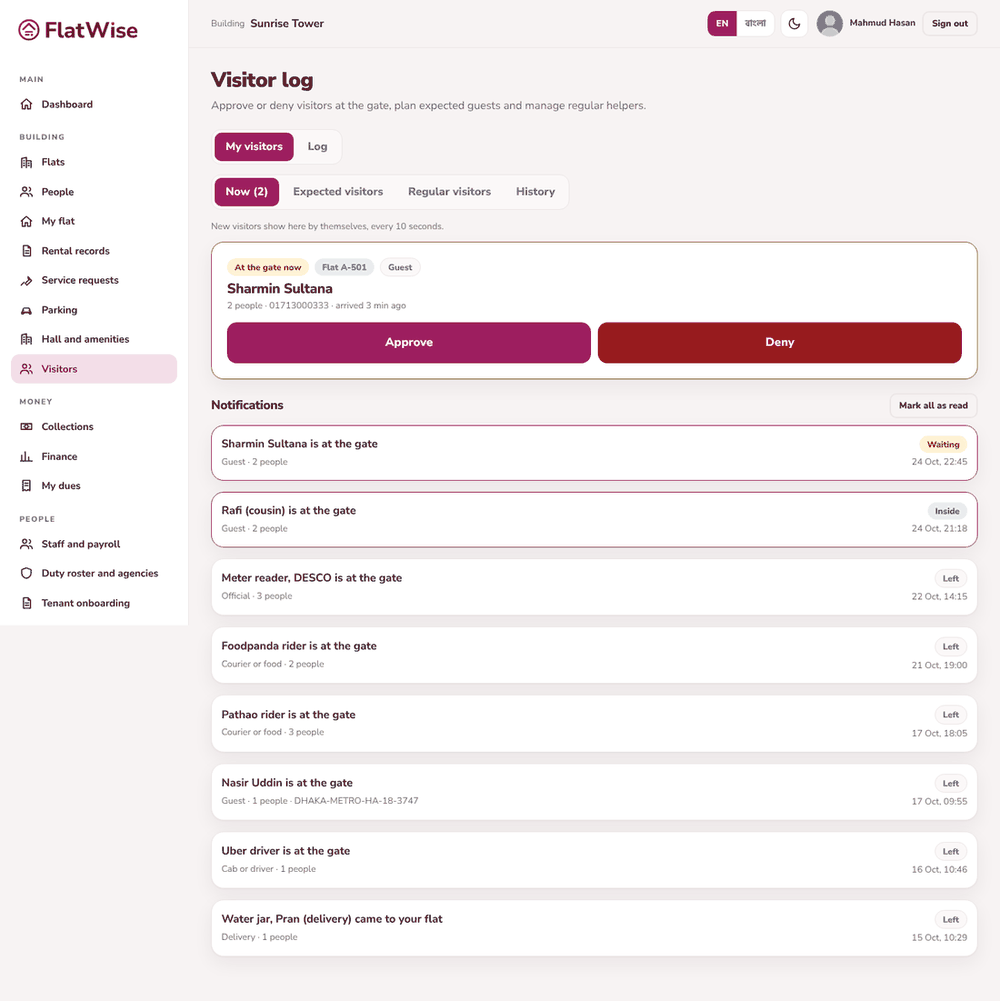
Open Visitors, tab My visitors. When someone is at the gate for your flat it shows under At the gate now. Press Approve or Deny.
To expect a guest press Expect a visitor, enter the name and the time window, and Make the code. Give the 6-digit code to your guest. It is shown only once.
The guard types the code at the gate and your guest comes in without waiting. A code works once, only in the time you set.
For a maid, driver, tutor or cook, open Regular visitors and press Add. The guard can let them in without calling you while the dates are valid.
Notifications lists everyone who came to your flat. Press Mark all as read.
Tips
If nobody in a flat has a login, the guard calls the flat instead.
Remove a regular visitor the day they stop working for you.